
On this page
LinkedIn outbound breaks when you treat InMail like cold email with a profile attached.
It is its own channel.
InMail gives you a subject line and a direct path into the inbox of somebody you are not connected to. It looks like LinkedIn, but the mechanics are much closer to cold email.
One outbound team is already sending more than 250,000 InMails per month across more than 1,000 active clients, alongside more than 4 million cold emails.
Treat the numbers as directional. The system underneath them is the useful part.
Cold email inboxes are crowded. InMail inboxes are still strangely quiet.
The working estimate is that a typical buyer receives 10 to 15 cold emails but only one to three InMails. That lower competition can make an average offer work better on LinkedIn than through email.
Take SEO for dentists. That offer can fail through cold email and still generate replies through InMail simply because the channel is less crowded.
In one client comparison, roughly 10,000 cold emails and 14,000 InMails went to a similar audience with the same offer.
InMail produced more than twice the reply rate and seven times the leads.
Treat the comparison as directional too. Twice the reply rate and seven times the leads is still enough to pay attention.
The system runs from sender infrastructure through reply handling.
You need a control layer for campaign decisions, a sender, and somewhere durable to store replies. That can be a spreadsheet or CRM, HeyReach, and Claude Code or Codex. Everything else is optional.
Before you run any of this
Compliance and legal disclaimer: This guide is provided for general educational and operational-planning purposes only. It is not legal advice, compliance advice, or a guarantee that any tactic, tool, account source, data source, or message is permitted. Before running a campaign, users should independently review LinkedIn's current User Agreement and policies, applicable privacy and electronic-marketing laws, employment or contractor permissions, client agreements, data-processing obligations, and the rules that apply in every sender and recipient jurisdiction. Obtain informed authorization from every sender, maintain suppression and opt-out controls, and consult qualified legal counsel where appropriate. Platform rules and laws change; the operator is responsible for ongoing compliance.
The model combines campaign strategy with several account-sourcing options.
The operating model also includes acquired “avatar” profiles and unofficial Sales Navigator licenses pushed through automated rotation.
This article gives full coverage of the operating model. Account-source decisions remain with the operator under the compliance disclaimer above.
Where sending capacity comes from
The sender profile sets both capacity and operating risk.
The six common source models trade trust for capacity in different ways.
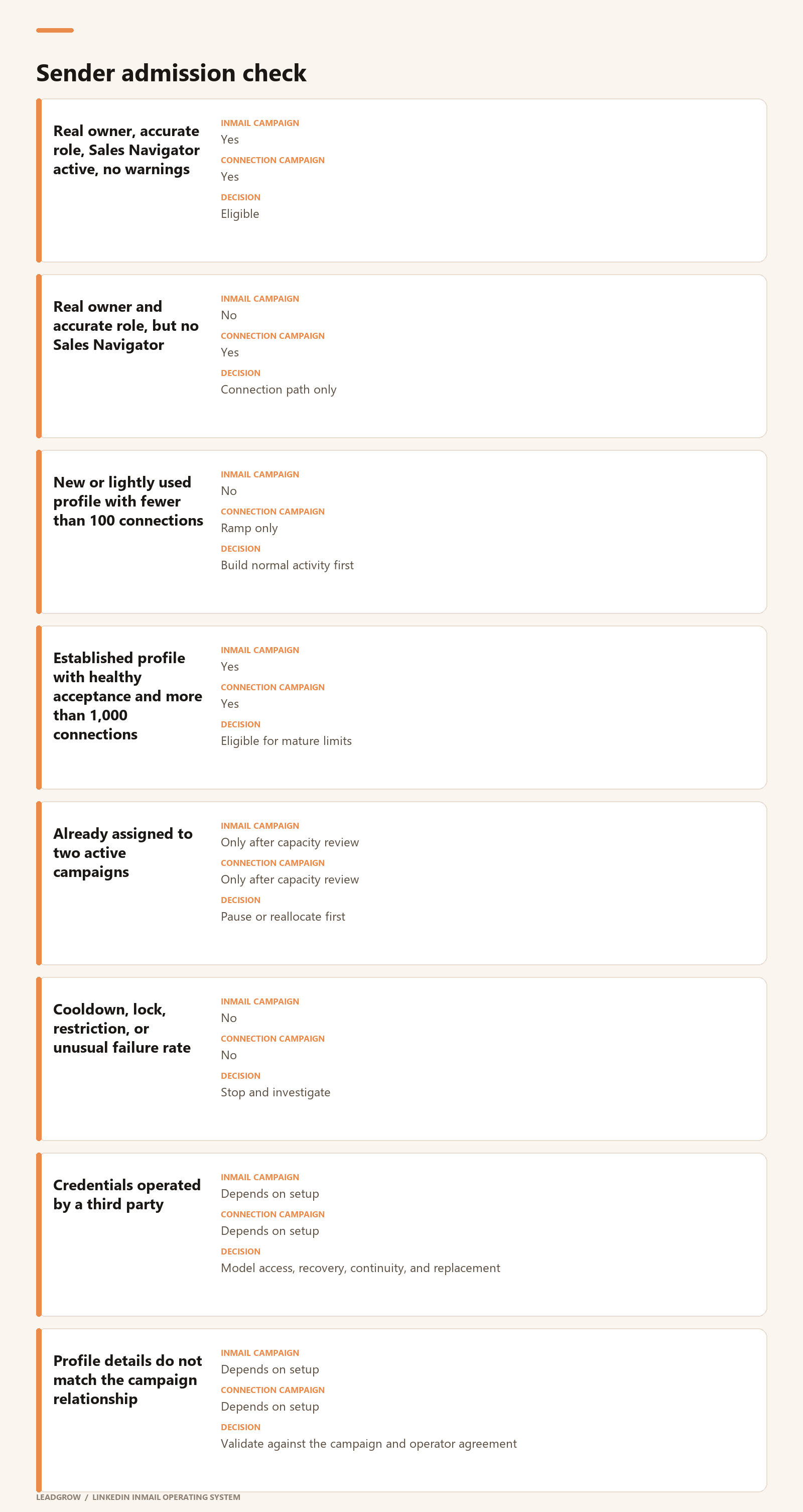
Founder and executive profiles
Founder profiles carry the most trust because the work history is visible. Save them for the accounts where that trust changes the odds.
Do not consume founder attention on broad, unqualified lists.
Internal employees
Internal team members are the cleanest repeatable source of capacity.
Each person must knowingly participate and keep control of their account. Use multifactor authentication.
Offboarding means removing the seat and campaign access. It does not mean taking ownership of the employee's personal LinkedIn account.
Contractors and agency operators
Contractors can add legitimate capacity when the profile accurately reflects who they are and how they work with the company.
The same rule applies to agency employees. They may represent a client relationship, but they should not claim to be a client employee when they are not.
Client-assigned seats
A client can purchase Sales Navigator seats and assign them to authorized people. Each person activates the seat through their own LinkedIn identity.
This provides central billing and license control without credential sharing.
It is another way to add controlled sender capacity without changing the account-acquisition model.
Additional operating measures
Apply these controls to every legitimate sender:
- use an accurate, non-sales title when the person's actual role supports it;
- maintain one automation controller per profile;
- document the account owner, seat owner, campaign owner, and reply owner;
- record explicit participation approval;
- keep credentials and multifactor authentication with the identity owner;
- store campaign state and business conversation records in the CRM;
- define an offboarding process before launch;
- cap each sender by observed account health, not a theoretical maximum;
- stop on restrictions rather than attempting to replace or disguise the sender;
maintain suppression and do-not-contact lists across every channel.
The infrastructure
At a high level, the infrastructure is stupidly simple: there are two sending paths.
Path one: InMail
InMail is LinkedIn's paid direct-message product. It lets you message someone without connecting first.
A standard Sales Navigator license includes a limited number of paid InMail credits. Use roughly 50 per month as the working assumption.
At a 10% reply rate, 50 messages produce five replies. That is not enough volume to create a large pipeline.
This is why the entire model revolves around Open Profiles.
What is an Open Profile?
Open Profile is a Premium setting that allows other LinkedIn members to message the account without connecting first.
A Sales Navigator account may be able to send roughly 400 to 800 Open Profile InMails per month without consuming standard paid credits.
Treat this as an invisible allowance, not a clearly published entitlement.
The range is not stable.
LinkedIn can change Open Profile volume without notice. A recent reduction was partly reversed after disrupting heavy InMail users.
Why LinkedIn partly reversed that change is unknown.
Open Profile capacity varies by account. Measure it instead of forecasting from a benchmark.
Do not forecast guaranteed volume from the 400 to 800 range. Measure the real allowance on each legitimate sender account.
Send Open Profiles first
In roughly 95% of observed cases, exhausting all 50 paid InMail credits prevented the account from sending more Open Profile InMails, even when the Open Profile allowance had not been used.
The safest order of operations is therefore:
- Send only to verified Open Profiles first.
- Preserve the paid-credit balance while that audience is running.
- Use paid credits on closed profiles afterward.
Bad Open Profile data can cause a sending tool to hit closed profiles by mistake. That burns paid credits early and may shut down the larger Open Profile campaign.
How much can one profile actually send?
There are three separate InMail constraints per sender:
- Paid credits: Use about 50 per month as the baseline.
- Open Profile allowance: Use roughly 400 to 800 per month as a range, then replace it with observed volume.
- Total monthly InMail limit: LinkedIn can impose a separate dynamic ceiling across Open and closed profiles.
- The capacity of one sender is not
50 + 800by default. - It is the smallest remaining limit at that moment.
available InMail capacity
= minimum of:
remaining total monthly allowance
remaining Open Profile allowance
qualified Open Profile audience
available paid credits for closed profiles
sender's permitted daily throughput
HeyReach currently caps automated InMail at 40 per sender per day. That is a software safety ceiling, not proof that LinkedIn will permit 40 sends every day for the full month.
For planning, use each sender's trailing 30-day completed volume. Do not multiply a theoretical daily maximum by 30.
The planning formula is:
monthly campaign capacity
= sum of each sender's observed safe monthly volume
× expected Open Profile accuracy
× expected campaign completion rate
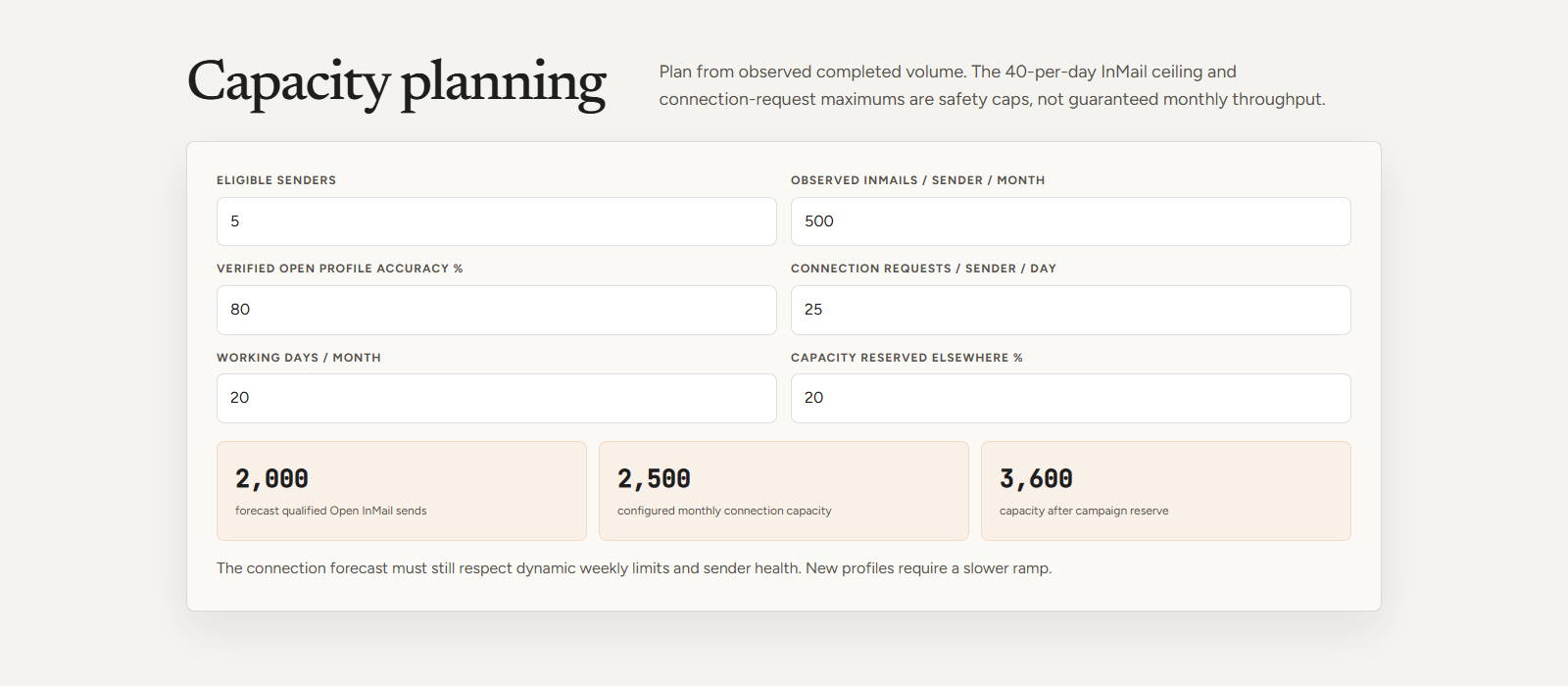
If five real senders each completed 500 InMails during the last 30 days, the working capacity is 2,500. If the list is only 80% verified Open Profiles, the useful Open audience is closer to 2,000.
The calculator snapshot below keeps those assumptions visible. It also reserves 20% of the combined InMail and connection capacity for other campaigns, leaving 3,600 usable actions in the working month.
Keep paid-credit capacity as a separate line. Replies may restore a paid credit, while unused credits may expire at the billing reset.
Connection-sequence volume
Normal connection outreach has a different capacity model.
HeyReach currently recommends about 25 connection requests per day after an account is warmed up.
It says accounts with more than 1,000 connections and healthy acceptance can move to 30 per day. The interface allows up to 40, but HeyReach advises against treating 40 as the normal target.
The weekly ceiling is dynamic. HeyReach says its system caps connection requests at no more than 200 per sender per week and may place the sender into Cooldown Mode sooner.
A mature sender usually completes a few hundred connection requests per month. Forecast from that account's history.
New or lightly used accounts need a slower ramp. They should not inherit the same limit as an established profile.
Mixed-campaign volume rules
Do not plan InMail and connection requests as if they were interchangeable actions.
Use one routing campaign:
- Check whether the lead is already a first-degree connection.
- If connected, send a normal message.
- If not connected, check Open Profile status.
- If Open, send InMail.
- If closed, send a connection request or reserve the lead for paid InMail.
- This prevents the same person from entering separate InMail and connection campaigns at the same time.
- Each person gets one active LinkedIn path, recorded centrally.
Path two: normal LinkedIn sequencing
The second path is normal connection-based outreach.
Send the connection request first. After acceptance, start a short conversation and earn the call.
This path is less transactional and more reputation-driven.
The recipient will inspect the sender before replying. A complete, credible profile is part of the message.
That is why normal sequencing should be reserved for valuable accounts and run through profiles with real expertise and an active presence.
One profile, one sender
Treat a LinkedIn profile like an email inbox. More profiles create more sending capacity, and more Sales Navigator licenses create more InMail capacity.
The legitimate example is a fractional recruiter. Someone working with several companies may be assigned a Sales Navigator license by each company.
The same logic extends into multiple stacked licenses and acquired avatar profiles. Loading extreme volume onto one profile is risky and likely to trigger detection.
Unofficial international licenses can require monthly reactivation and may lose inbox history.
That portion is the weakest part of the system operationally.
Purchased accounts can disappear or expose private conversations. That failure can also destroy the follow-up history.
The durable infrastructure is a team of real senders with accurate roles and legitimate access.
Do not use sales titles by default.
Use a broader title only when it matches the work the person actually does.
“SDR” or “Account Executive” tells the reader that a pitch is coming before they see the offer. But changing the title only works when the replacement is true.
Your profile does more selling than you think
A sender profile should do four jobs:
- Headline: State the outcome the person helps create.
- Banner: Show either the offer or a strong proof point.
- Featured section: Link to one useful resource and the strongest case studies.
- About section: Explain the person's actual work and why a prospect should care.
- Ty Frankel's profile is a useful structural reference.
The goal is not to copy the wording. It is to make the profile human enough that a prospect understands who is contacting them and why they might be worth answering.
Who gets the sends
LinkedIn is gated by volume. That changes everything.
LinkedIn gives you fewer sends than cold email. A poor lead wastes a larger share of the campaign.
The quality threshold has to be higher.
Prove the campaign in email first
The safest starting point is a cold-email campaign that already produces positive replies and meetings.
Score each campaign using:
- positive reply rate;
- qualified meetings per 1,000 contacts;
- opportunity rate;
- expected contract value;
- available proof;
- list depth;
common objections.
Only the strongest campaigns escalate into LinkedIn.
This is where our GTM Orchestrator workflow enters. Even if a basic offer can work in a less crowded channel, scarce LinkedIn capacity is best spent on an offer that has already shown demand.
Score the account and contact
After a campaign qualifies, score each company and contact.
Tier-one companies and tier-one decision-makers enter first.
Company scoring should answer one question: is this account valuable enough for a scarce LinkedIn touch?
Contact scoring should prove that the person can buy and is reachable through the chosen path.
The basic rule is:
- The strongest companies and strongest people get the scarcest channel.
- Which profiles carry which campaigns?
- A connected sender is not automatically an eligible sender.
- Each campaign needs a sender-admission check before any leads are assigned.
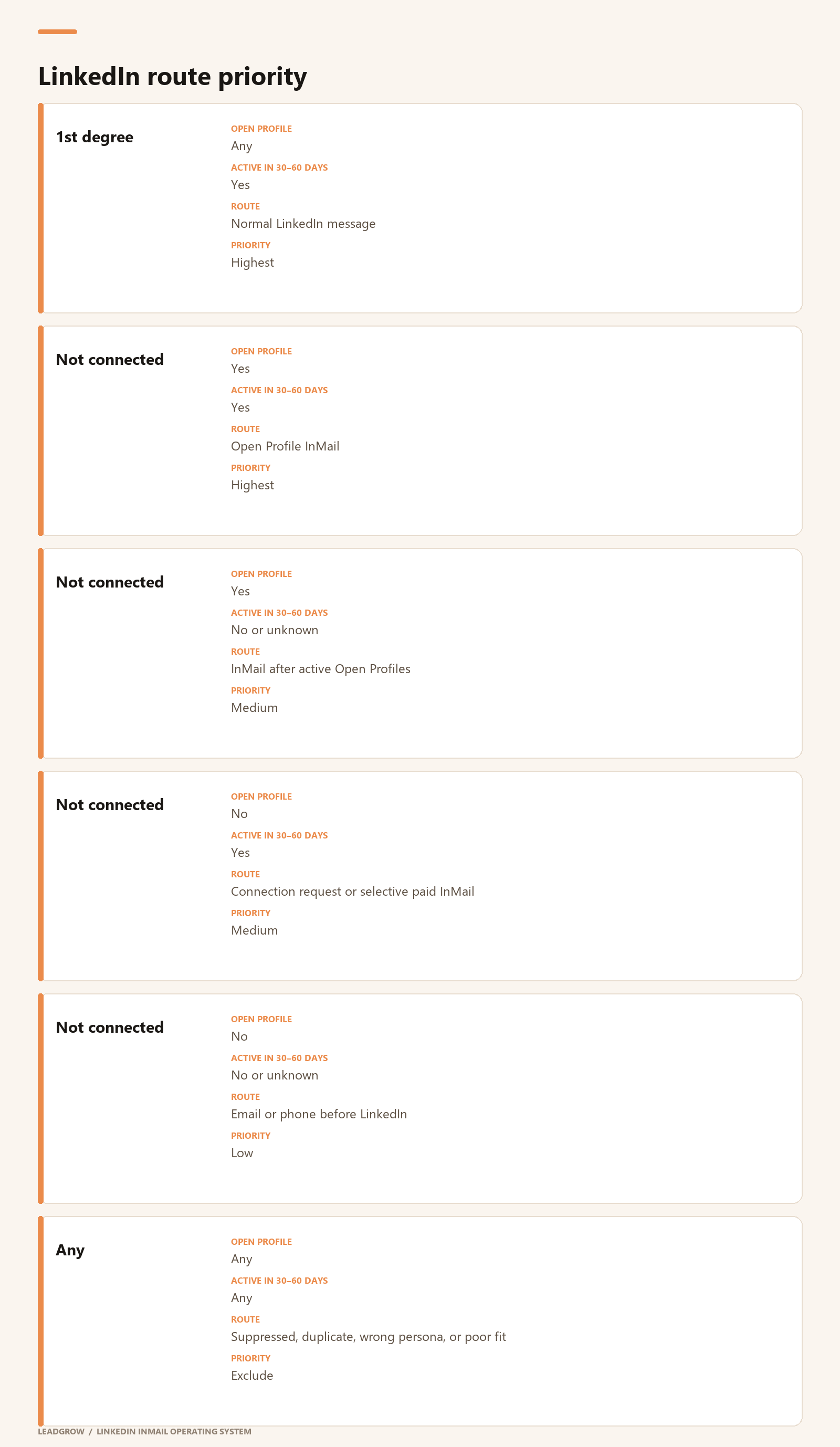
The sender should also fit the campaign.
A founder or executive profile belongs on the smallest, highest-value list. Internal growth or partnerships profiles can carry repeatable volume across tier-one and tier-two accounts.
Disclosed contractors and agency operators should only run campaigns where their relationship to the offer can be explained truthfully.
Each sender receives a written capacity allocation before launch:
sender allocation
= observed safe daily actions

- manual activity reserve
- actions committed to other campaigns
- safety buffer
Never assign leads based on the maximum configured limit alone.
Which accounts deserve LinkedIn?
Use three account tiers.
Tier 1: Exact company fit, meaningful deal value, strong proof match, and a current buying or relevance signal. These accounts receive the full LinkedIn treatment.
Tier 2: Strong company fit and deal value, but no current signal. These accounts enter when Tier 1 cannot fill available capacity.
Tier 3: Broad fit, weaker proof match, low value, or unclear need. Keep these accounts in lower-cost channels until performance proves otherwise.
Before tiering, remove:
- existing customers;
- open opportunities owned by another seller;
- competitors and their employees;
- current and former employees where inappropriate;
- previously declined or opted-out contacts;
- duplicate people or companies;
- accounts outside the agreed geography, size, or industry;
companies that cannot realistically buy the offer.
Which people get contacted?
Within each qualified company, rank people by buying authority.
Persona 1: Budget owner or direct owner of the problem. Send first.
Persona 2: Strong champion or operational leader. Use when the budget owner is unreachable or when this person clearly influences the purchase.
Persona 3: Adjacent role with weak ownership. Keep out unless earlier personas are exhausted and the campaign has evidence that this role converts.
Do not add five people from the same company at once.
Start with the strongest person. Add another only after a defined delay or a clear failure state. This avoids making the campaign look like an account-wide blast.
Route by Open Profile status and activity
Open Profile status determines whether InMail is available without a normal paid credit. Recent activity estimates whether someone is likely to see the message.
Connection degree determines whether a normal message is already available.
Use all three together:
- LinkedIn outbound breaks when you treat InMail like cold email with a profile attached.
- It is its own channel.
InMail gives you a subject line and a direct path into the inbox of somebody you are not connected to. It looks like LinkedIn, but the mechanics are much closer to cold email.
One outbound team is already sending more than 250,000 InMails per month across more than 1,000 active clients, alongside more than 4 million cold emails.
Treat the numbers as directional. The system underneath them is the useful part.
Cold email inboxes are crowded. InMail inboxes are still strangely quiet.
The working estimate is that a typical buyer receives 10 to 15 cold emails but only one to three InMails. That lower competition can make an average offer work better on LinkedIn than through email.
Take SEO for dentists. That offer can fail through cold email and still generate replies through InMail simply because the channel is less crowded.
In one client comparison, roughly 10,000 cold emails and 14,000 InMails went to a similar audience with the same offer.
InMail produced more than twice the reply rate and seven times the leads.
Treat the comparison as directional too. Twice the reply rate and seven times the leads is still enough to pay attention.
The system runs from sender infrastructure through reply handling.
You need a control layer for campaign decisions, a sender, and somewhere durable to store replies. That can be a spreadsheet or CRM, HeyReach, and Claude Code or Codex. Everything else is optional.
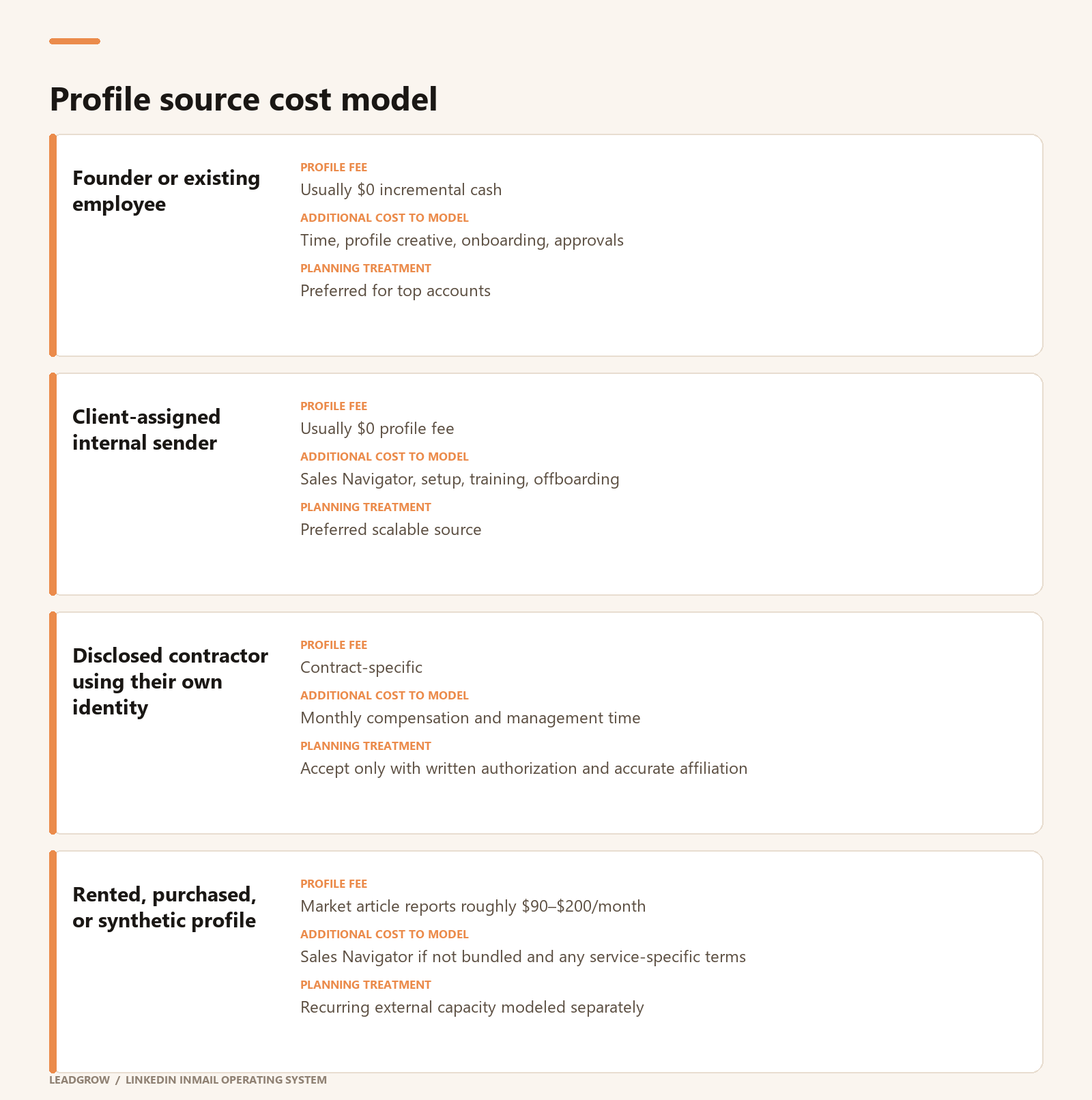
Do not treat inactive as fake or permanently unreachable.
Activity is a prioritization signal. A narrow market may still justify contacting inactive profiles after the active tier is exhausted.
Make one final routing decision
A person enters a LinkedIn campaign only when every required gate passes:
campaign proven or approved for pilot
AND company tier is allowed
AND persona tier is allowed
AND suppression checks pass
AND sender is eligible
AND sender has allocated capacity
AND connection degree is known
AND Open Profile status is current enough for routing
AND channel path is unique
Build the base list with an agent
Getleads, quickenrich you name it.
The important point is not the exact database.
The list request should combine firmographic requirements, buying signals, and the target role before anyone enters the campaign.
GTM Orchestrator owns the specification and the accepted lead record. Every search must preserve why a lead passed.
Use Claude Code or Codex to help with the search, not to relax the acceptance criteria.
Verify Open Profile status before sending
This is the most important enrichment step.
The example operation uses NetNut's API to determine whether a contact currently has an Open Profile. It reports that several APIs were tested and NetNut offered the best accuracy for the price.
Many vendors use cached data.
Cached status creates a dangerous failure mode:
- A lead is incorrectly marked Open.
- The sequencing tool sends an InMail.
- LinkedIn consumes a paid credit.
- Enough bad records exhaust paid credits.
- The remaining Open Profile campaign may stop.
- For high-value campaigns, compare a small manually checked sample against the provider's output before launch.
- Treat “Open Profile” as time-sensitive data.
Send to active people first
The next filter is LinkedIn activity during the previous 30 to 60 days.
The example operation uses cookieless Apify actors to identify recent activity and sends to active people first.
Prioritizing recently active profiles can improve reply performance, but there is no audited lift to forecast from.
The filter may not work for a narrow market. If only 500 people can buy, removing everyone inactive for 60 days may shrink the audience too far.
Use activity as a ranking signal before using it as a hard exclusion.
Make sure they can actually buy
The final list-building layer checks whether the person and company truly fit the campaign.
AI-agent workflows can visit company websites and pull additional context. The example stack uses DiscoGen for this validation.
In GTM Orchestrator, this belongs after raw discovery and before campaign assignment.
The output should answer two questions:
- Is this a company that can buy the offer?
- Is this a person who owns or strongly influences the problem?
- If either answer is weak, do not spend a LinkedIn touch.
Write InMail like cold email
Use the same direct-response rules for InMail:
- use an internal-looking subject line;
- keep the message short;
- make the body direct;
- use a simple, conversational call to action;
write like a human.
In a less crowded channel, qualified volume usually matters more than elaborate AI personalization.
If forced to choose between an elaborate AI campaign and sending more qualified InMails, choose volume.
That does not mean generic blasting.
Generic blasting is still wrong. Reach more people only when each one fits the same offer.
The message can be this simple
Subject: quick question about {{initiative}}
Hi {{first_name}}, noticed {{relevant signal}}.
We help {{peer group}} achieve {{outcome}} without {{friction}}. Happy to send {{useful proof or asset}} if relevant.
Worth sharing?
Use this as a structure, not a verbatim template.
Test links instead of arguing about them
InMail does not have the same deliverability mechanics as cold email, so a link in the first message may be viable.
At the time of recording, this was still being tested.
LinkedIn shows an external-site warning when someone clicks a link. Its effect on conversion is still unclear.
Treat first-message links as an experiment, not a settled rule.
Test a no-link version, a useful-resource link, and a booking link separately.
What each profile actually costs
The cost model has three moving parts:
- sender-profile acquisition;
- Sales Navigator licenses;
HeyReach sender capacity.
The calculators model only these three costs.
All figures below are USD planning figures before tax. Recheck the linked pricing pages before purchasing.
What HeyReach costs
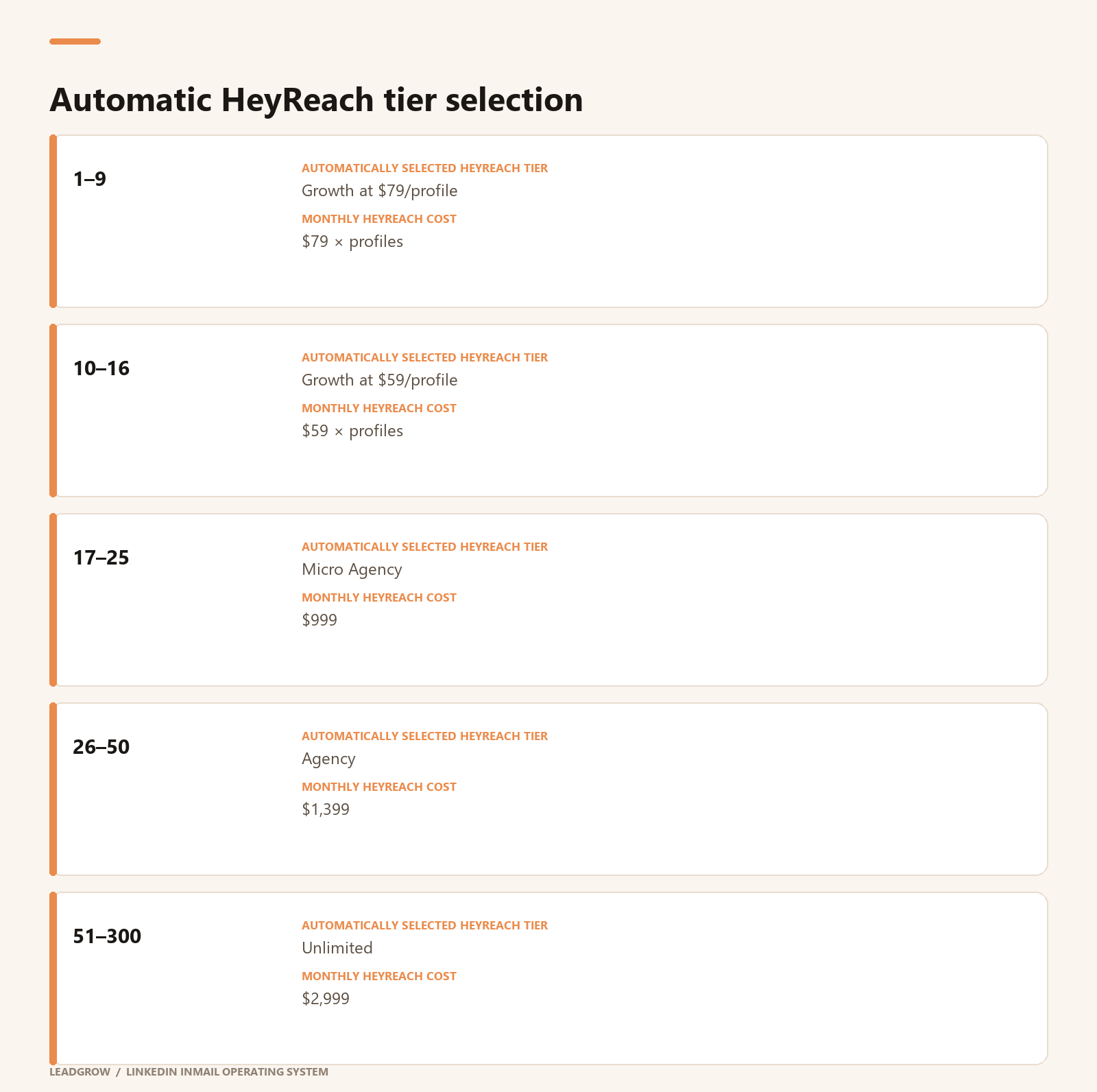
What Sales Navigator costs
For the working model in this guide, assume each active sender can receive a Sales Navigator license sourced from India for $30 per month.
I would recommend looking around reddit, whatsapp groups and fb but you can absolutely find someone to do this for you.
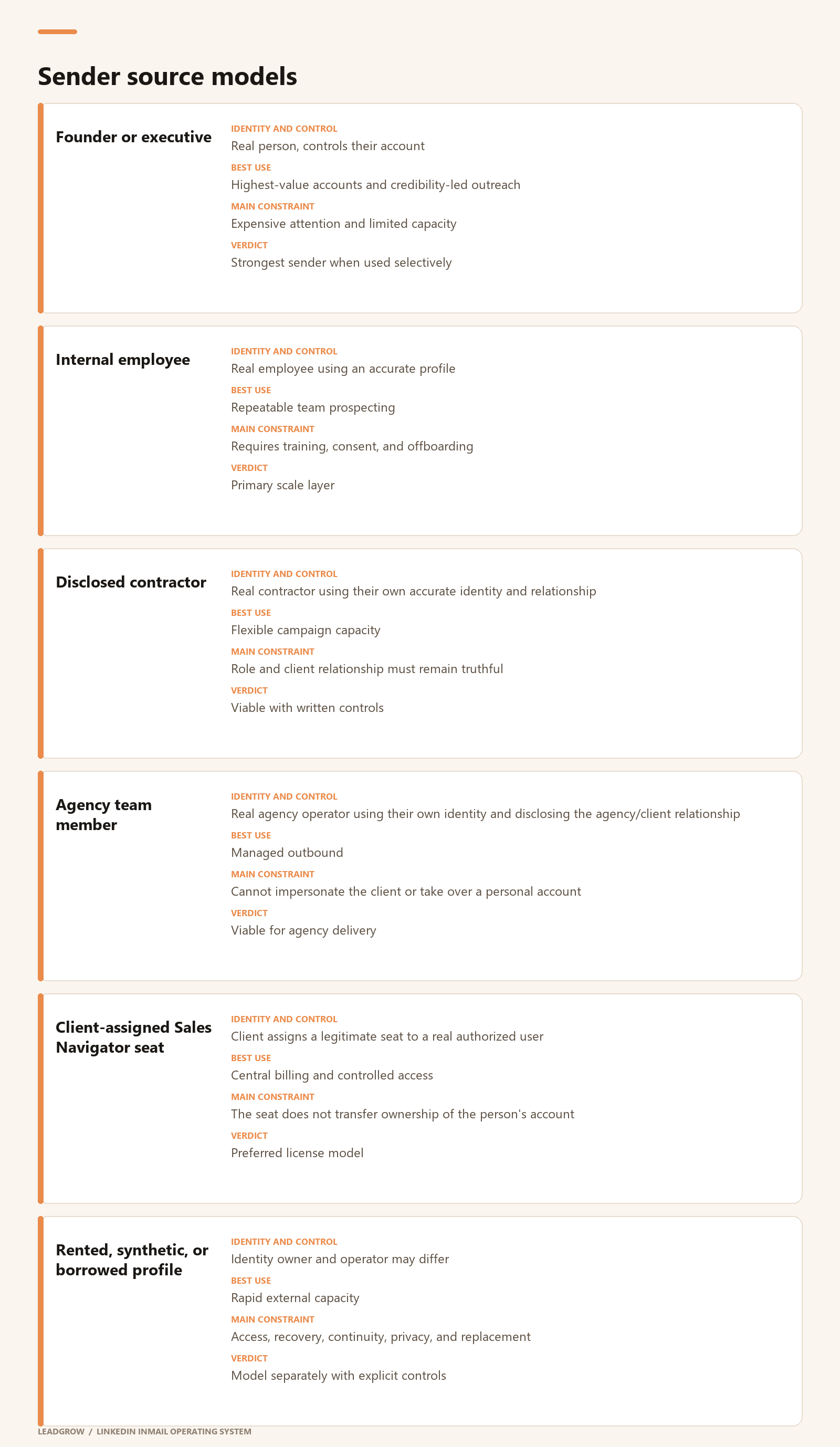
What the profile itself costs
Treat the sender identity and the software seat as separate costs.
The $90–$200 range comes from a June 2026 Salesforge market roundup. It is vendor-reported marketing data, not an independently audited market price. The same article acknowledges account-sharing and platform-policy risk.
For the working acquired-account model in this guide, use $150 per account per month for 1–9 profiles and $135 per account per month at 10 or more profiles. This is a recurring profile-acquisition expense, not a one-time setup fee.
Do not confuse a low profile subscription with the complete monthly stack. Sales Navigator and HeyReach remain separate unless a package explicitly bundles them.
Cost per send that actually completes
Do not divide spend by a theoretical daily cap. Divide it by completed sends from eligible profiles.
Using the article's conservative capacity assumptions:
- 10 active senders
- × 500 completed InMails per sender
- × 80% verified Open Profile accuracy
- = 4,000 qualified completed sends
For an existing authorized-sender stack with no recurring profile-acquisition cost:
$890 / 4,000 = $0.22 base infrastructure cost per qualified send
For the working 10-profile model at $135/profile/month:
- $2,240 / 4,000 = $0.56 base infrastructure cost per qualified send
- Both figures cover sender infrastructure only
Turning replies into meetings
Getting replies is the visible part. Turning them into meetings is where the operation either works or falls apart.
InMail makes it easy for somebody to accept or decline. Great. A “yes” is still not a booked call.
Put every conversation in one place
The main problem with sequencing on LinkedIn is that you have to be very careful about pulling inboxes to pull replies in.
No matter what sequencer you use, you're always gonna have a delay of replies hitting your inbox so in an ideal world you have access to all of the profiles if you believe speed to lead is causing you to lose traction.
At Lead Grow we have a fast reply system that puts every lead from email, LinkedIn, and WhatsApp directly in one place.
I would recommend setting up something like this
What happens after a positive reply
After an interested reply:
- Respond inside the original InMail thread.
- Enrich the contact for a phone number.
- Call when the lead and timing justify it.
- Enrich for business email.
- Follow up by email with context that a colleague reached out.
- If needed, have a senior person follow up from their own legitimate profile.
- The goal is speed, not channel spam.
Each new touch should acknowledge the real prior interaction. Do not pretend a colleague spoke with the lead when that did not happen.
What HeyReach should own
HeyReach sends. It should not decide who deserves a send.
HeyReach and AimFox are both InMail sequencing options.
AimFox could rotate among multiple licenses at the time of review. Both tools may misidentify Open Profiles.
That is why enrichment and routing have to sit before the sender.
The clean architecture is:
- → campaign scoring
- → company and contact scoring
- → Open Profile verification
- → recent-activity ranking
- → ICP validation
- → channel routing
- → HeyReach or another sender
- → MasterInbox
- → Slack + Attio CRM
- → human response handling
- → performance feedback
HeyReach is interchangeable. Keep campaign state outside the sending tool so a sender change does not erase the campaign's logic.
The recommended campaign shape
HeyReach's current InMail documentation recommends using its native If Open Profile condition.
The sequence should be:
- Lead enters campaign
- → If 1st-degree connection
- → Send normal message
- → If not connected
- → If Open Profile
- → Send InMail
- → If not Open Profile
- → Send connection request
- → Wait for acceptance
- → Send normal message
For HeyReach InMail, every assigned sender needs an active Sales Navigator subscription connected and synchronized with HeyReach.
Use the native Open Profile check at send time even if an upstream provider already supplied the field.
The upstream check is useful for forecasting and list routing. The HeyReach check is the final guard against status changes and stale data.
Rotation creates capacity
HeyReach can distribute one campaign across multiple senders.
This is the correct scaling unit when those senders are real people with legitimate access.
Adding five senders does not make each sender faster. It gives the campaign five separate, account-level capacity pools.
Before launch, check whether any assigned sender is already active elsewhere. Existing campaigns reduce the volume available to the new campaign.
The campaign forecast should therefore use allocated capacity, not total configured limits.
sender capacity available to campaign
= sender's observed safe volume
- volume reserved for other campaigns
- manual activity performed by the account owner
Manual LinkedIn work still consumes activity. Coordinate with the profile owner so automation and normal use do not compete unexpectedly.
Working hours and delays
Short sending windows reduce completed volume because HeyReach randomizes delays between actions.
Use a realistic workday window rather than compressing every action into two or three hours.
After an InMail, leave at least 24 to 48 hours before any automated follow-up. HeyReach warns that a short delay can queue the next message before the platform detects the recipient's reply.
That creates the worst possible experience: someone replies, then receives an automated follow-up as if they had not.
What to check every day
Check the following every day:
- Sales Navigator disconnected;
- Sales Navigator license connected to the wrong seat;
- zero paid credits;
- Open Profile cap reached;
- total monthly InMail cap reached;
- InMail error;
- high failed-lead rate;
- Cooldown Mode or account lock;
- campaign active but outside working hours;
- another campaign consuming the sender's actions;
- stale credit balance after renewal;
replies arriving after the next step was queued.
HeyReach displays Cooldown Mode with a snowflake. A high failed-lead rate can also pause a campaign automatically.
After a Sales Navigator renewal, re-sync the account if HeyReach has not detected the restored credit balance
The whole system
Strip away the tools and the full system looks like this:
- Start with a strong introductory offer.
- Prove the campaign through cold email where possible.
- Score the campaign before assigning scarce LinkedIn capacity.
- Score companies and people.
- Build the base list through company, role, hiring, and technology filters.
- Verify Open Profile status with current data.
- Rank people active in the previous 30 to 60 days.
- Validate company and contact fit.
- Route verified Open Profiles before spending paid credits.
- Keep the copy short and the ask conversational.
- Test first-message links separately.
- Use connection sequencing for valuable prospects who fit that path.
- Centralize every reply.
- Alert humans immediately on interest.
- Follow up in the original thread, then use another channel only when it fits.
- Store every interaction in the CRM.
- Report results daily and review costs weekly.
- Feed reply and opportunity data back into campaign scoring.
Originally published on X: The Complete LinkedIn InMail Operating System